
There’s less than 8 hours left on the Mantic Kickstarter! Now’s a really great opportunity to get a heap of minis at a really great deal!
Don’t miss out!
There’s less than 8 hours left on the Mantic Kickstarter! Now’s a really great opportunity to get a heap of minis at a really great deal!
Don’t miss out!

So, I’ve been following along with Jim Pacek’s DM Prep Page posts, mostly because the first one caught my attention.
I normally scribble notes on some scratch paper as we play and they’re maybe legible an hour later (never mind by the time the next session rolls around). Stuff like, “How much XP do we have,” always comes up (not throwing stones, I suck at tracking it as a player, too).
So, some structure & format to notes can only be a good thing. They’ll help make session recap (the next time, or here) simpler viable. Jim’s got a neat little sheet, so I stole (the idea of) it.
(His other prep stuff so far is pretty OSR specific. While the pregenerated hit dice rolls are inspired, they’re not especially useful to a WFRP game; though they did motivate me to throw together a spreadsheet of random d10 rolls. We’ll see if that speeds anything up.)
Anyway, here’s what I’ve got so far.
It’s intended to be printed, double-sided on 11″x17″ and folded along and with the center line on the inside. That leaves a space to hole-punch to keep it in a binder.
I’m hoping that some additional structure emerges, but currently it’s some session notes on the outside and space on the inside to track stuff that happens during combat or whatever. I’m kinda doing what Jim does with the hit dice over there on the right with blocking off rows for NPCs and such.
Like I said, there’s still room for structure to emerge.
I’ll be giving it a spin on Friday (with the last session of the 4E game), so we’ll see if it’s useful (or turns out to a waste of an afternoon).
Thoughts? Questions? Suggestions?

I picked up The Metamorphica the other week; it’s a lengthy collection of (as far as I can tell) totally system agnostic random tables, as well as some notes on how to leverage them. I’d be leery of calling them “random mutation” tables: they cover that, but also insanities, super powers and psionics.
Anyway, the PDF is free, but I ordered the book because I’m a sucker for random tables, books in A5, system agnostic stuff (and it was easy to add to a Lulu order I was going to place anyway).
This thing is great. When I say these tables are all over the place: I’m not kidding. Entries look like this:

I could get into the specific contents (there are 104 body: form entries, 164 body: function entries, etc), but I’m not sure how useful those sorts of metrics are… and it’s free, so I’m sure you can figure that stuff out.
At a high level, though: it’s mostly mutations/psychoses/powers sorted into groups. Appendix #1 is a bunch of tables for random stuff (plants! colors! animals! body parts!), #2 provides alternate arrangements of mutations & powers, #3 provides instructions for theming those mutations & powers to different settings and #4 provides instructions for creating specific types of creatures (like beastmen, demons, and plants). Again, all of it system agnostic.
Really though, let’s do stuff with it.
Here’s a mutant: d6 mutations gave me 4.
| Roll | Description |
|---|---|
| 780 | Lights nearby are brighter and more violet |
| 325 | Photosynthetic |
| 004 | Amorphous |
| 775 | Crystalline Body |
So, it’s a medium-sized crystalline blob that draws power from the sun, sucking away entire spectrums of light as it refracts through its hideous form. That’ll do.
I’ve got WFRP on the mind, with its myriad and enthusiastic chaos/mutation systems, so I rolled up a few chaos characters. Fortunately, Realms of Chaos is in Metzger’s bibliography, so there’s a page in Appendix 3 about creating chaos-y characters.
First, a Chaos Sorcerer:
| Item | Roll | Description |
|---|---|---|
| Gift of Chaos | 3 | Demonic Weapon |
| Telltale | 61 | Turns to stone in sunlight |
| Mutation | 671 | Psychic Detection |
Nothing mind shattering here, but definitely kinda creepy. I can’t find a “demonic weapon” table anywhere, which feels like an omission, but at the same time, even though Slaves to Darkness has something like 18 pages on creating Daemonic Weapons, “has a weapon that’s a demon” is kind of enough, you know?
And now, a Chaos Lord:
| Item | Roll | Description |
|---|---|---|
| Demonic Phenomenon | 61 | Food and drink spoils |
| Telltale | 27 | Plants move and try to grab the mutant |
| Gift of Chaos | 1 | Blood Rage |
| Gift of Chaos | 8 | Wings |
| Gift of Chaos | 7 | Pallid Siphon |
| Mutation | 505 | ADD |
| Mutation | 661 | Pain Broadcast |

How is it that I haven’t posted these here yet? Anyway:
I keep forgetting I have various innate bound spells (Battle Prayers, wizard wagon weapons) until I’ve blown all of my power dice (if I’m lucky; I normally remember them several phases after that).
So, knocked together a couple of cards to print out and put with my various spell cards to keep track of them. There’s one for Battle Prayers, the Luminark, and the Hurricanum. They should print out to be the same size as the spell cards (3″ x 4 5/16″).
If you’ve got a copy of the Empire book, grab ’em here. (If you don’t have the Empire book, you probably shouldn’t.)

I’m super-excited about Zweihänder the Warhammerless revision/rewrite of the WFRP system. It’s been on my radar for a bit, but because I’m terrible about checking in on Strike-to-Stun… it’s not easy for me to keep up with it. And I’d like to keep up with it, ’cause I want to be able to order it when it drops.
So, I set up an RSS Pipe that reports whenever Moniker (the developer) posts to the Zweihänder subforum. It catches every post, not just “Order Zweihänder now!”, but it’s in my (RSS reader’s) face without drowning me in notices every time anyone posts there.
If this is something you’d find useful: here’s the feed. (And, if the pipe itself is useful to you, here’s the pipe.)

That might sound overly confrontational. I dunno. It certainly turned out more of a battle than I anticipated.
I started these six Halberdiers I don’t know how long ago. More than a month ago, at least. Early April.
The new Citadel Paints had just dropped and, because I’m just starting this army, “buy up as many old paints as you can,” isn’t sustainable enough for me. So, since I’m going to have to start using them anyway, I did just that.

Yeesh.
I can’t blame the fact that it took me ~six weeks to paint six dudes entirely on the paints: a lot of real-life excitement popped off in late April and early May (though most of it lent itself to painting more and not less)… but option paralysis and result disappointment really annihilated any momentum I managed to develop.
So, here are the dudes. They’re painted mostly with new GW paints in place of the old GW paints. P3 paints weren’t changed. Notes on the original color scheme can be found here.

Significant color changes are:
| Was | Now | |
|---|---|---|
| Blue | Basecoat – GW Regal Blue Layer – GW Enchanted Blue Highlight – Reaper True Blue Wash – 3:3:2 GW Asurmen Blue Water Matte Medium wash |
Basecoat – GW Kantor Blue Layer – GW Caledor Sky Highlight – GW Hoeth Blue Glaze – Guilliman Blue |
| Yellow | Basecoat – GW Iyanden Darksun Wash – GW Gryphonne Sepia Layer – GW Iyanden Darksun Highlight – GW Golden Yellow |
Basecoat – GW XV-88 Basecoat – GW Balor Brown Wash – 1:1 GW Cassandora Yellow GW Seraphim Sepia Layer – GW Balor Brown Layer – GW Zamesi Desert Highlight – GW Ushabti Bone Glaze – GW Lamenters Yellow |
| Skin | Basecoat- GW Tallarn Flesh Layer – GW Elf Flesh Wash – 3:3:2 GW Ogryn Flesh Water Matte Medium wash Highlight – GW Elf Flesh |
Basecoat – GW Bugman’s Glow Basecoat – GW Cadian Fleshtone Layer – Kislev Flesh Wash – 3:3:2 GW Reikland Flesh Water Matte Medium wash Highlight – GW Kislev Flesh |
So, let’s compare the two paint sets. In each picture, the hapless Halberdier on the left is the old scheme, the one on the right is the new.


The yellow is more vibrant. We can attribute that, I think, to Lamenters Yellow. Unfortunately, it’s a hair brighter than I’d like. Conversely, the blue is more drab… in the old scheme the blue was matched well with the yellow. In the new, the blue’s too dark and the yellow’s too bright.
The skin is particularly bothersome: I just cracked caucasian flesh. The new scheme just isn’t nearly as good.
The bases are edged differently: Calthan Brown on the left, Mournfang Brown on the right.
(Also, what’s up with the red on the blue feather? Sloppy, Rush!)
The new paints are good, mind you. I like the way they handle. I like the additional selection. I’m extremely disappointed in how they compare to the old paints, however. I know that they (GW, GW employees) have to say they’re equivalent, but they just aren’t. To suggest that Mournfang Brown is comparable to Bestial Brown (nevermind Calthan Brown, too) is insulting.
(It looks like my standby killer Scorched Brown -> Bestial Brown -> Snakebite Leather -> Devlan Mud combo’s been broken.)
So, anyway, I’m not happy about it.


I actually wrote the HDR post about a week before I posted it: I’m trying to be better about pacing my posts. I’ve been antsy about it going up ’cause I think it’s interesting.
That antsy-ness, plus avoidance of the Daemon mess, motivated me to fiddle with stuff some more.

I changed up the lightbox arrangement a bit. First, I swapped out the Pegasus terrain with the prepainted Ruined Chapel piece since it’s got a bit more varied color in it (and the neat stained glass effect). Then, I worked my way through my images folder to find suitable backdrops and printed out a couple of them on 11×17 paper. Mounted them to foamboard and hit them with some Dullcote to cut down on reflection. Finally, I replaced the white drop cloth with a black one.
Then, I took some more HDR pictures, matching up a few different HDR apps. Here are the results:
Librarian:

Deathwing Techmarine:

(Next time, I’m just going to do row & column headers. I think that, by this point, we know the second row is post-I’m Feeling Lucky, right?)
Anyway, what do y’all think?
My observations:

I feel I need to preface this with a disclaimer: I’m not much of a photographer. Photography’s not my hobby: taking better pictures is, for the most part, something motivated solely by my desire to better present toy soldiers that I’ve painted.
Also, HDR is a thing that’s been around for 160 years, with software-based approaches being invented while I was still in high school. So, this is nothing new… but it’s new to me, and that means it merits a post. :)
I’d never heard about it until I saw a post that HDR Fusion was free for a day. Free’s my kind of price, so I grabbed it and immediately learned that it’s terrible for taking pictures of cats. (Because they barely sit still long enough for one exposure, nevermind two.)
The short version is that, rather than taking a single picture, you take multiple pictures at varying levels of exposure, then run them through a process that pulls them together into a single image: the dark parts are darker and the light parts are lighter, resulting in a more vibrant, interesting result.
I really love this example from the Wikipedia article linked above:
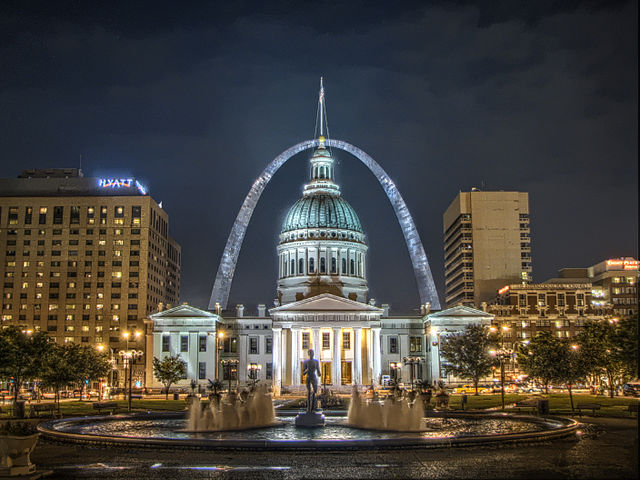
There are some more gorgeous examples here.
Inspiration seized me to try it out on minis. Unfortunately, I was at work, so I only had MOTUC figures, and not minis, handy. Here are the results: the same figures photographed using the normal camera and the HDR function, with both images run through Picasa’s I’m Feeling Lucky.

As I’ve mentioned before: Picasa‘s I’m Feeling Lucky makes everything look so much better; given how negligible an effort’s involved, everyone should be using it. Really.
Still, this… was not very impressive. I actually think the Normal + Picasa looks the best out of the four, but Gygor’s undeniably a much more vibrant neon prehistoric Eternian ape warlord in the HDR + Picasa shot.
I figured that this is because they’re just in front of the bland, off-white my office walls are painted. For HDR to produce interesting results, it probably needs contrasts: more brights to brighten against more darks to darken.
So, after I got the dining room table cleared off (amazing how messy the house can get when everyone but the cats is sick for a month) and the lightbox out to photograph the Ratwyrm, I figured I should grab some terrain and fiddle with HDR some more. Here are the results. (Make sure to click through to see them at the full resolution.)
Warlock Engineer:

Librarian:

(I’m glad I only did the two: pulling together the comparisons in GIMP isn’t difficult, but it sure ain’t fast.)
I stuck them on some Pegasus terrain; it definitely made a difference. For better effect, I probably should layer some terrain to obscure the white backdrop (and consider replacing the white with black, but I don’t know if that won’t just change one boring background for another).
As expected, I’m Feeling Lucky made everything better, and I think the HDR results (modified by Picasa or not) look better than the normal photographs.
I think that, in both cases, the Normal (unmodified) produced truer colors, but I don’t think any of the other shots distorted them significantly. Rather than some of the crazy effects that I linked to above, I’ve gotten fairly accurate pictures of my minis, just more striking.
Another thing to consider is that these HDR images were done with HDR Fusion: the phone’s camera natively supports HDR (apparently), and I’ve read that Pro HDR is the go-to HDR app. Never mind the fact that this is all being done with a freaking cameraphone. A real camera would be sure to produce even more interesting results.
What do y’all think? Useful? Interesting? Helpful? I’m curious! Maybe if there’s enough interest, I’ll put some different HDR apps up against each other.
You might have heard about Borders closing down and being liquidated. As it’s where the lovely and tolerant Mrs. Rushputin likes to buy her smut shōjo manga, she’s been cruising through our local store regularly as it goes through its liquidation. While scanning around to fill gaps in her run of Mixed Vegetables, she noticed that they had begun liquidating furniture and fixtures.
They’ve got a number of very, very large tables that would make excellent gaming tables: if we had a basement, it’s the sort of thing that would definitely go there.
More significantly: they’ve got several glass-fronted display cases. IIRC, these were where the overpriced CD/DVD collections lived. Getting a display case for my minis is something that’s been on our to-do list for a long, long time: with as much time and money I’ve invested in my hobby, we’d like to pull its fruits out of plastic drawers in the closet and put them on display. So, when she noticed these, she gave me a call.
We did some measuring and thinking and, after sleeping on it, headed out to buy one.
We had to do a tiny bit of demo to get it: all four of their cases were fixed to each other: an end piece on one side, another display case on the other, and a strip along the top holding it to the case behind it. It took all of five minutes to sort that out, though.

It stands 4’8″ tall, 13″ deep and 3′ wide. It’s pretty big, but not too big. The shelves are space apart enough that their future contents should be well-lit enough, but it shouldn’t be difficult to install lighting if it becomes necessary.
If you’re in a similar spot, and have been looking for a display case: consider one of these (or, maybe, waiting for the liquidators to get more desperate and then consider one of these). This one’s in pretty good shape: some of the others are a bit rougher.

A couple of months ago, I shared some details about how I track my progress through this hobby and how satisfying it is to be able to look back on all I’ve accomplished over the past year. I ended with a promise to make a blank copy of it available to anyone interested in doing the same.
Well, I’m done! It took me a bit longer than I thought it would (I initially thought I’d be done with this back in October) but the extra time went into refining the sort of data it tracks (it now accounts for assembly and conversion, in addition to simple painting) and making the formulae as flexible as possible (because I wanted this to be accessible to folks who don’t have a lot of Excel experience.)
I’m going to walk through how to access it and then how to use it.
Q: How Do I Access This Thing?
The spreadsheet is a Google Spreadsheet. To maintain your own copy, you need a Google account: if you have a Blogger blog, you already have one. It will be added to and interfaced from your Google Documents page.
To get to the blank copy I’ve created for you (yes, you!) to access:
You should now be in edit-mode for the spreadsheet. Inconveniently, though, all of the sheets are locked down. That’s so the sheet is always pristine for the next guy. When the spreadsheet’s in your account, that won’t affect you.
Click “File” -> “Make a Copy”

Call it whatever you want. It’s yours, now. Leave the checkbox unchecked.
That’s all there is to it!
Q: How Do I Use This Thing?
There are six sheets in this sucker.
General rule: if the cell is greyed out: you probably should leave it alone. It’s calculated.
Also, I’ve include a little bit of data to provide you with an example of how this stuff should look. Alternatively, you can always check out my copy.
1. Introduction

I blab a bit about what the sheet does and why I did it. Sort of like I’m doing here, but with less verbosity. You can delete this if you want, hang onto it, whatever.
2. Hobby

As far as I’m concerned, this is the meat of the sheet. Here’s where you log what you finish as you finish it. Note the year, the month, the model. How many, what system and army. What the type is.
Key fields here are:
If you’ve painted something without building it, leave Assembly Value blank. If you build something without painting it, leave Painting Value blank. (If I build something one month and paint it the next, I’m giving it two lines, but that’s up to you.)


It’s really intended to not be a lot of work.
At first, it’ll look sparse and empty, but before you know it it’ll have a lot of information and you’ll be able to look back on exactly what you’ve managed to accomplish.